The CNC machine's control software cannot simply be reinstalled, so the data was absolutely critical. Ideally we wanted not only to read it, but also to put it back onto a working medium that could be plugged straight back into the machine.
Read head replacement and a binary copy
After connecting the drive to the PC-3000 Express it spun up but kept failing on reads. The behavior pointed to damaged read heads, which is no surprise on a drive that had served more than two decades in an industrial environment — the mechanical parts rarely survive that long without consequences. We proceeded to replace the read heads using a compatible donor drive. On a model this old that is no small task in itself, because donor units from the MHK family have long since stopped being readily available.
After the swap the drive stabilized and we were able to create a binary copy. The result was very good: only three bad sectors remained in the resulting copy, and they affected neither the system nor the user data.
Getting the data back into the machine
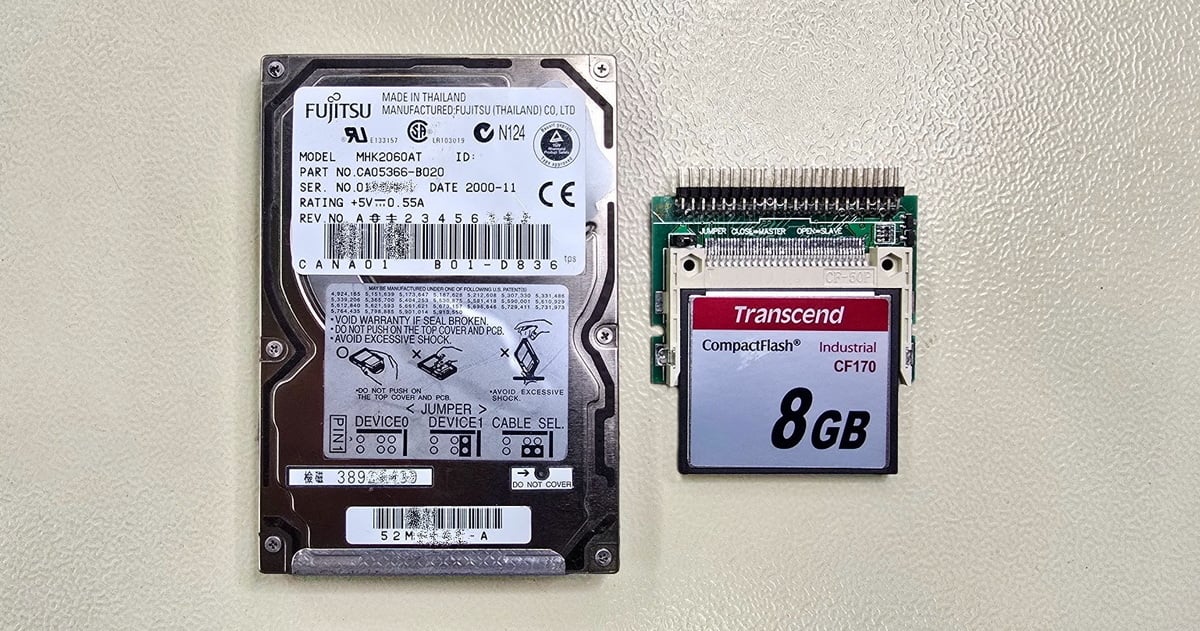
Recovering the data is one thing; getting it back into a machine that is a quarter of a century old is another. The original Fujitsu drive is no longer available to buy, and even if one turned up, its reliability after years in storage would be a risk in itself. As a replacement we chose a Transcend CF170 Industrial CompactFlash card with a capacity of 8 GB, fitted in a Delock 91655 adapter (CF to 44-pin IDE). The key feature of the CF170 is its support for True IDE Fixed Disk Mode — the card identifies itself to the control system as an ordinary hard drive, which the old BIOS requires in order to boot. With a card presenting itself as removable media, the machine would not boot at all.
Cloning the copy onto the card was not straightforward, however. The PC-3000 Express reads data from the drive reliably, but it does not support writing back to the target medium over the ATA port. We had to take a detour: we transferred the binary copy to an older desktop computer with an IDE controller and performed the sector-level cloning onto the CF card using the dd tool under Linux. Here too we hit a complication typical of working with old hardware — modern Linux distributions will not fit on a machine with a mere 64 MB of RAM, so an older, lightweight distribution small enough to fit into memory and boot from CD came into play.
The cloning took about ten minutes. The resulting CF card holds a complete sector-by-sector copy of the original drive, including the master boot record (MBR), the partition table, the Windows 98 SE system, and the CNC machine's control software. Working with the IDE interface and obsolete systems comes with its own challenges — if you want to know more, we covered it in our article on forgotten data on a forgotten interface.
The outcome
The CF card is in service. The client fitted it into the adapter, connected it to the lathe's control PC, and the machine booted successfully. Compared with the original hard drive, the card has no moving parts, is resistant to the vibration that is unavoidable around a machine tool, and its operating temperature range of –25 to +85 °C covers even demanding industrial conditions. Thanks to the stored sector-by-sector copy we can also produce a replacement card within minutes, should the client ever need one.
Drive: Fujitsu MHK2060AT (CA05366-B020), a 2.5-inch hard drive from a CNC lathe's control PC
Interface: IDE (PATA)
Capacity: 6 GB
Problem: Damaged read heads; the control system reported "Disk boot failure"
Solution: Read head replacement, a binary copy, and cloning onto a Transcend CF170 Industrial CF card in an IDE adapter
Result: Three bad sectors with no impact on the data; the CNC machine booted successfully from the CF card
If you too run into a drive failure in industrial equipment or an ordinary computer, handle the original medium with care and do not attempt a repair on your own. Even a seemingly trivial step, such as connecting an old drive to the wrong adapter, can make matters irreversibly worse. Contact EXALAB for free diagnostics, or read about when DIY recovery makes sense and when to call in the professionals.
Technical terms in more detail
True IDE Fixed Disk Mode — a mode in which a CompactFlash card identifies itself to the host system as a hard drive with an IDE interface, rather than as removable media. For older systems this is essential: many period BIOSes and control units refuse to boot an operating system from a medium that presents itself as removable. In this mode the card takes the exact place of the original drive.
Binary copy (clone) — a complete copy of the entire drive transferred sector by sector onto the target medium. Unlike copying individual files, it preserves the full structure of the drive, including the boot sector, the partition table, and all system areas. For the system drives of industrial equipment this is the only correct approach, because the control system expects the data exactly where the original drive had it.
- Details
- By Frantisek Fridrich
- Parent Category: Blog
- From Practice